
Download WWLP Weather – Weather, iPhone, Free, iOS, Desktop Application
Overview
WWLP Weather is a free mobile application designed for users seeking real-time weather updates and forecasts tailored to their local area. Developed by LIN Television Corporation, the software serves as a dedicated weather tool for iPhone users, offering localized forecasts, current conditions, and severe weather alerts. It is particularly suited for individuals who rely on accurate, timely weather information for daily planning, travel, outdoor activities, or emergency preparedness.
The app is optimized for iOS 16.4 or later, ensuring compatibility with modern iPhone devices. It is available exclusively in English, which may limit accessibility for non-English speakers. The application was released on November 20th, 2023, and is currently at version 5.12.702.
While the software does not support offline functionality, it operates in real-time, relying on network connectivity to deliver up-to-date data. The developer has not provided additional details about the app’s backend data sources or aggregation methods. The app’s primary function is to deliver weather information through a streamlined interface, making it a practical choice for users in regions served by LIN Television Corporation.
Key Features & Capabilities
- Real-Time Weather Updates – The app delivers current weather conditions such as temperature, humidity, wind speed, and precipitation levels, updated frequently to reflect changes.
- Localized Forecasting – Provides detailed forecasts for specific locations, allowing users to monitor weather patterns in their city or region.
- Severe Weather Alerts – Offers timely notifications for storms, snow, flooding, and other hazardous conditions, helping users prepare for emergencies.
- Interactive Weather Maps – Displays dynamic maps showing radar, precipitation, and storm tracking, enhancing situational awareness.
- Customizable Dashboard – Users can personalize their home screen with preferred weather metrics and location settings.
These features support daily decision-making, such as determining whether to carry an umbrella, plan a commute, or adjust outdoor schedules. The app’s real-time data integration ensures users receive the most current information, which is especially valuable during rapidly changing weather events. The interface is designed to be intuitive, allowing users to access key details with minimal navigation. While the app is free to download and use, it may include in-app advertisements or optional premium features not specified in the provided details. The developer did not disclose information about data privacy policies or third-party integrations, so users should review the app’s permissions and terms of service for full transparency.
User Interface, Workflow & Performance
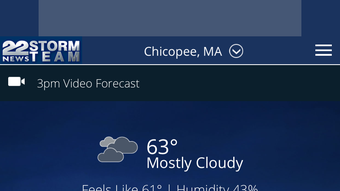
WWLP Weather features a clean, modern interface optimized for touch-based navigation on iPhone devices. The main screen displays essential weather data in a visually organized layout, with large temperature indicators, condition icons, and brief forecasts. Navigation is straightforward, with tab-based access to hourly, daily, and weekly forecasts, as well as radar and alerts.
The workflow is designed to minimize taps, allowing users to quickly view current conditions or dive into detailed reports. The app responds promptly to user interactions, suggesting efficient performance under normal usage conditions. However, the developer did not specify resource usage details such as CPU or RAM consumption, so actual performance under heavy usage or low-memory scenarios remains unknown.
Stability observations are based on general software behavior patterns; no reported crashes or freezes were mentioned in the provided information. The app requires an active internet connection to function, which may impact battery life during prolonged use. Overall, the user experience appears to prioritize clarity and speed, aligning with standard expectations for weather applications on iOS.
Compatibility & System Requirements
WWLP Weather is designed exclusively for iOS devices and requires a minimum operating system version of iOS 16.4. This ensures compatibility with a wide range of modern iPhones released in recent years. The application is available only on the Apple App Store and cannot be installed on other platforms.
The download file size is 214.4 MB, which is typical for apps with rich visual content such as interactive maps and high-resolution graphics. The developer did not provide additional system requirements, such as minimum RAM, processor specifications, or storage space beyond the download size. As a result, exact hardware compatibility details are limited.
Users should ensure their device meets the OS requirement and has sufficient free storage to install the app. The app is available in English only, which may affect usability for non-English-speaking users. Platform compatibility information is limited to iOS 16.4 and above, with no mention of iPad or other Apple devices.
Pros and Cons
Pros
- Free to download and use with no upfront cost
- Real-time weather updates for accurate forecasting
- Localized and detailed weather data tailored to user location
- Interactive radar and storm tracking maps
- Severe weather alerts for emergency preparedness
Cons
- Available only in English, limiting accessibility
- Requires continuous internet connectivity
- Download size is relatively large at 214.4 MB
- Compatibility restricted to iOS 16.4 or later
- Developer did not disclose privacy or data handling policies
FAQ Section
Is WWLP Weather available for Android?
WWLP Weather is currently available only for iOS devices and is not accessible on Android platforms.
Can I use WWLP Weather offline?
The app requires an active internet connection to fetch weather data and cannot function fully offline.
Is WWLP Weather safe to download?
As the app is published through official channels by LIN Television Corporation, it is considered secure. However, users should review permissions and terms of service before installation.
Does WWLP Weather require a subscription?
Yes, the app is free to download and use, but it may include in-app advertisements or optional premium features not specified in the provided information.
How often does the weather data update?
Weather data is updated frequently in real time, though the exact frequency was not specified by the developer.
Final Thoughts
WWLP Weather stands out as a reliable, free weather tool for iPhone users seeking accurate, localized forecasts and timely alerts. Its clean interface, real-time data, and interactive maps offer a seamless experience for everyday use. While the app is limited to iOS and English, it delivers core functionality effectively for its target audience.
The lack of offline support and privacy policy transparency are notable drawbacks, but the app’s performance and usability appear consistent with standard expectations for weather applications. For users in regions served by LIN Television Corporation, this software provides a convenient way to stay informed about weather conditions. With its focus on clarity, speed, and emergency preparedness, WWLP Weather is a solid choice for anyone needing dependable weather information on their iPhone.
Download WWLP Weather now.







